
Download Syntha AI README Generator – Fast, Free, Secure Documentation Tool
Overview: Why Syntha AI README Generator Is a Game‑Changer for Developers
In the fast‑paced world of software development, the quality of your project documentation can be the difference between a smooth onboarding experience and a frustrating roadblock for collaborators. Syntha AI README Generator steps onto this stage as a web‑based, AI‑powered solution that automatically crafts professional README.md files in seconds. By simply uploading your source code or project folder, the tool analyses the structure, detects the primary language, and produces a clean, standardized README that follows industry best practices. The service supports a wide range of programming languages—from JavaScript, Python, and Java to Go, Rust, and even niche scripting languages—making it a universal ally for solo developers, open‑source contributors, and enterprise teams alike.
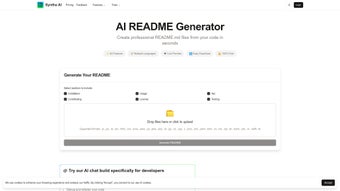
What sets Syntha AI apart from generic template generators is its ability to blend automation with deep customization. Users can select which sections appear (e.g., Installation, Usage, Contributing, License), define custom headings, and even inject project‑specific badges or screenshots. A live preview window lets you verify the markdown before you hit the “Download” button, ensuring the final file matches your branding and tone. Because the platform runs entirely in the browser, no personal data is stored on a remote server, giving you peace of mind about security and compliance. Whether you’re polishing a brand‑new repository or updating legacy documentation, Syntha AI slashes the time spent on manual formatting from hours to minutes—freeing you to focus on code, not copy‑pasting.
In addition to its core generation capabilities, Syntha AI includes helpful post‑generation tools such as a markdown linter, a link validator, and a version‑control friendly diff view. These features guarantee that the generated README not only looks good but also adheres to the technical standards of platforms like GitHub, GitLab, and Bitbucket. The free tier provides unlimited generations with no watermarks, while premium plans unlock advanced AI models for deeper code analysis, multi‑project batch processing, and priority support. For teams that need to enforce corporate style guides, the tool can be configured with custom templates that automatically insert legal notices or company branding. In short, Syntha AI README Generator is the modern, secure, and efficient documentation companion every developer needs.
Core Features & Customization Options
- AI‑Driven Content Generation: Uses large‑language models to understand code structure and automatically write coherent sections such as Overview, Installation, Usage, and Contribution guidelines.
- Multi‑Language Support: Detects over 30 programming languages and frameworks, tailoring the README to language‑specific conventions.
- Section Picker & Order Control: Choose which sections to include and rearrange them with a drag‑and‑drop interface.
- Live Markdown Preview: Real‑time rendering lets you see exactly how the final
README.mdwill appear on GitHub, GitLab, or any markdown viewer. - Custom Badges & Screenshots: Upload your own SVG badges or screenshots; the tool embeds them with proper markdown syntax.
- Post‑Generation Linter: Checks for common markdown issues, broken links, and missing alt‑text for images.
- Version‑Control Diff Viewer: Compare the newly generated README with your existing file to see what changed.
- Secure Browser‑Only Processing: All generation happens client‑side; no files are uploaded to external servers, preserving privacy.
- Export Options: Download as raw markdown, copy to clipboard, or directly push to a connected GitHub repository via OAuth.
- Free Tier & Premium Add‑Ons: Unlimited free generations, with optional paid upgrades for batch processing, custom AI models, and priority support.
The flexibility of Syntha AI’s feature set is evident in the way it adapts to different project scales. For a tiny script, you might only need a brief “Installation” and “Usage” section. For a full‑blown framework, you can add “API Reference,” “Testing,” “Roadmap,” and “License” blocks, each automatically populated with context‑aware placeholders. The customization UI is intuitive: a sidebar lists all possible sections, each with a toggle switch and a small preview of the default content. Clicking a section opens a modal where you can edit the default text, add your own bullet points, or insert variables such as the repository name, version number, or author details—all pulled from the uploaded project metadata.
The tool’s AI model is continuously updated to reflect the latest documentation trends. For example, it now suggests inclusion of “Code of Conduct” and “Security Policy” sections for open‑source projects that aim to comply with GitHub’s community standards. Moreover, Syntha AI respects accessibility guidelines by prompting you to add descriptive alt‑text for images and ensuring proper heading hierarchy (H1‑H4) in the generated markdown. These built‑in best‑practice recommendations help you avoid common pitfalls that could otherwise lead to rejected pull requests or lower project visibility. The result is a README that is not only technically correct but also optimized for readability, SEO, and community engagement.
Installation, Usage & Compatibility Details
Getting Started – No Download Required
Syntha AI README Generator is a pure web application, so there’s no need to install any software on your machine. Simply navigate to the official site, and you’ll be greeted by a clean dashboard. The first step is to click the “Upload Project” button, which accepts a compressed .zip file or a direct folder drag‑and‑drop. The tool extracts the archive in the browser sandbox, scans the file tree, and identifies the primary language and framework based on file extensions and package manifests (e.g., package.json, requirements.txt, go.mod).
Step‑by‑Step Workflow
- Upload Your Project: Choose a
.zipfile or drag the folder onto the upload area. - Select Desired Sections: Use the sidebar to toggle “Installation,” “Usage,” “Contributing,” etc.
- Customize Content: Edit default text, add badges, or insert screenshots directly in the modal windows.
- Preview & Validate: Observe the live markdown preview, run the linter, and fix any flagged issues.
- Download or Push: Click “Download README.md” to save locally, or use the “Push to GitHub” option after authorizing via OAuth.
Compatibility Across Operating Systems
Because Syntha AI runs entirely in the browser, it is compatible with any modern operating system that supports up‑to‑date browsers. Whether you are on Windows 10/11, macOS Ventura, Linux (Ubuntu, Fedora, etc.), or even Chrome OS, the experience remains consistent. Mobile users on iOS 15+ or Android 12+ can also generate READMEs, though the UI is optimized for desktop screens for the best drag‑and‑drop experience. The tool works with Chrome, Edge, Firefox, Safari, and Chromium‑based browsers; older browsers may lack support for the WebAssembly‑based AI inference engine.
For teams that require offline generation—such as environments with strict network policies—Syntha AI offers an optional Electron wrapper that can be downloaded from the “Desktop App” section. This wrapper bundles the same AI model and UI, allowing generation without an internet connection while still keeping all processing local to the user’s machine. The desktop version is available for Windows (x64), macOS (Intel & Apple Silicon), and Linux (AppImage). Regardless of the platform, the generated README follows the same markdown standards, ensuring seamless integration with any CI/CD pipeline or repository hosting service.
Pros, Cons & Frequently Asked Questions
Pros
- Instant, AI‑driven README creation saves hours of manual writing.
- Supports over 30 programming languages and frameworks.
- Full customization of sections, order, and branding.
- Live preview and built‑in markdown linter ensure high‑quality output.
- Client‑side processing guarantees privacy and security.
- Free tier with unlimited generations; premium add‑ons for power users.
- Desktop Electron version available for offline use.
- Seamless GitHub integration for one‑click commits.
- Accessibility‑friendly defaults (alt‑text prompts, proper heading hierarchy).
- Continuous AI model updates keep the tool aligned with emerging documentation standards.
Cons
- Advanced AI models (premium) require a subscription.
- Large projects may take a few extra seconds to scan in the browser.
- Mobile UI is functional but less convenient for complex customizations.
- No native support for non‑markdown documentation formats (e.g., reStructuredText).
- Batch processing is limited to premium plans, which may be a barrier for very large teams.
FAQ – Your Most Common Questions Answered
Is Syntha AI README Generator really free?
Yes, the core functionality—unlimited README generation, live preview, and basic customization—is completely free. Premium features like batch processing, advanced AI models, and priority support are offered as optional paid upgrades.
Can I use the tool offline?
Absolutely. Syntha AI provides an Electron‑based desktop application for Windows, macOS, and Linux that runs entirely offline. The web version also works without an internet connection after the initial page load, as all AI processing occurs locally in the browser.
Which programming languages are supported?
Syntha AI recognises over 30 languages, including JavaScript/Node.js, TypeScript, Python, Java, C#, Go, Rust, Ruby, PHP, Kotlin, Swift, and many more. It also detects common frameworks like React, Angular, Django, Flask, Spring Boot, and .NET Core.
How does the tool ensure my code remains private?
All analysis and generation happen inside your browser’s sandbox. No files are uploaded to external servers, and no personal data is stored. The optional desktop app follows the same client‑side principle.
Can I push the generated README directly to my repository?
Yes. After generating the README, you can click “Push to GitHub,” which uses OAuth to create a new commit on the selected branch. The same workflow works for GitLab and Bitbucket with the appropriate integration enabled.
Conclusion & Call to Action
Documentation should never be an afterthought, and Syntha AI README Generator proves that high‑quality README files can be produced with the click of a button. By blending powerful AI analysis, extensive language support, and a suite of customization tools, the platform eliminates the tedious manual work that traditionally bogs down developers. Whether you’re a hobbyist launching a personal project, a maintainer of a popular open‑source library, or part of a corporate dev‑ops team, the free tier offers enough features to get you started, while premium upgrades give you the scalability needed for large‑scale documentation pipelines.
The tool’s client‑side processing model addresses growing concerns around data privacy, and its optional offline desktop version ensures that even the most security‑conscious organisations can adopt it without compromising internal policies. The built‑in linter, diff viewer, and accessibility prompts mean the generated README isn’t just a placeholder—it’s a polished, standards‑compliant entry point that improves discoverability on platforms like GitHub and boosts contributor confidence.
Ready to elevate your project’s first impression? Visit Syntha AI’s README Generator now, upload your code, and experience how quickly a polished, standards‑compliant README.md can be generated. Remember, a well‑crafted README not only improves collaboration but also boosts discoverability on platforms like GitHub and Bitbucket. Take advantage of the free tier today, and consider the premium plan if you need batch processing or corporate‑level style enforcement. Let Syntha AI handle the heavy lifting while you focus on building great software.
Syntha AI README Generator delivers fast, secure, and highly customizable documentation. The free tier’s unlimited generations, combined with professional‑grade AI, make it an indispensable tool for developers of all skill levels. The platform’s privacy‑first architecture and continuous feature updates ensure it stays relevant as documentation standards evolve. 4.5/5 stars.



.png)



